
Unified Write Filter ב-Windows
מדריך עבודה מעשי לעמדות ציבוריות, ספריות וקיוסקים: התקנת UWF, הגדרת Disk Overlay, החרגות ל-Defender, Windows Update, Chrome ו-Edge, עבודה בדומיין, תחזוקה וניטור.
מה UWF עושה
UWF מפנה כתיבות מה-Volume המוגן אל Overlay זמני. לאחר Restart השינויים הזמניים נעלמים, בעוד File ו-Registry Exclusions נכתבים ישירות לדיסק ונשמרים.
1. התקנת UWF
פתחו PowerShell כמנהל:
Enable-WindowsOptionalFeature -Online -FeatureName Client-UnifiedWriteFilter -All -NoRestartאתחלו את המחשב ואז בדקו:
Get-WindowsOptionalFeature -Online -FeatureName Client-UnifiedWriteFilter
uwfmgr.exe get-config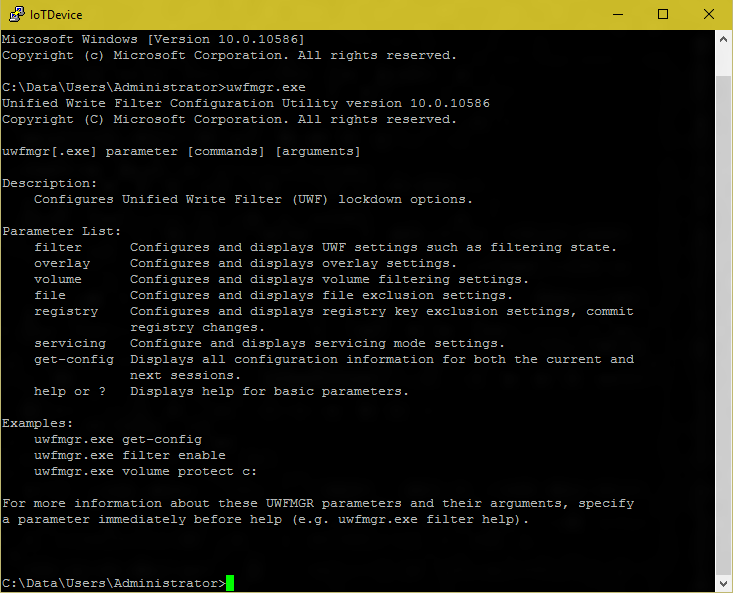
2. Disk Overlay והגנה על C:
לעמדות ציבוריות רגילות Disk Overlay הוא בחירה פרקטית משום שהוא משתמש באחסון המקומי במקום להקדיש RAM גדול. אין גודל אחיד שמתאים לכל תחנה. התחילו מ-12 עד 16GB ובדקו בפועל את צריכת ה-Overlay ביום עמוס.
בדוגמה הבאה מוגדר Overlay של 16GB עם Warning ב-80% ו-Critical ב-90%:
uwfmgr.exe overlay set-type disk
uwfmgr.exe overlay set-size 16384
uwfmgr.exe overlay set-warningthreshold 13107
uwfmgr.exe overlay set-criticalthreshold 14745

uwfmgr.exe volume protect C:
powercfg.exe /h off

uwfmgr.exe filter enable
uwfmgr.exe get-config
לאחר שווידאתם שה-Next Session נכון:
uwfmgr.exe filter restartuwfmgr.exe get-config את Current Session ואת Next Session.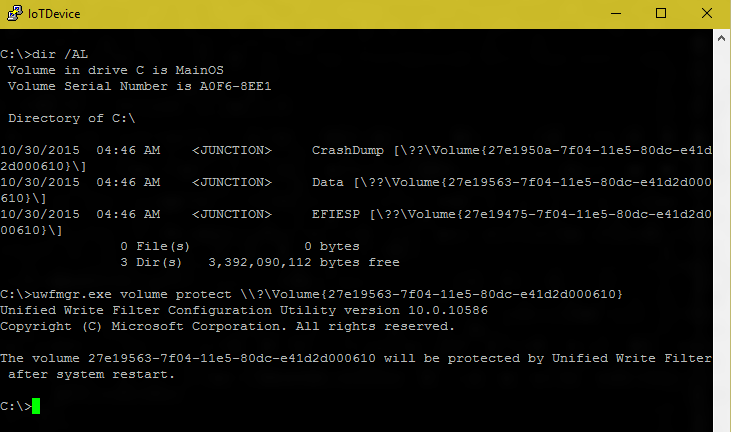
3. החרגות מומלצות
Microsoft Defender
uwfmgr.exe file add-exclusion "C:\Program Files\Windows Defender"
uwfmgr.exe file add-exclusion "C:\ProgramData\Microsoft\Windows Defender"
uwfmgr.exe file add-exclusion "C:\Windows\WindowsUpdate.log"
uwfmgr.exe file add-exclusion "C:\Windows\Temp\MpCmdRun.log"

uwfmgr.exe registry add-exclusion "HKLM\SOFTWARE\Microsoft\Windows Defender"
uwfmgr.exe registry add-exclusion "HKLM\SYSTEM\CurrentControlSet\Services\WdBoot"
uwfmgr.exe registry add-exclusion "HKLM\SYSTEM\CurrentControlSet\Services\WdFilter"
uwfmgr.exe registry add-exclusion "HKLM\SYSTEM\CurrentControlSet\Services\WdNisSvc"
uwfmgr.exe registry add-exclusion "HKLM\SYSTEM\CurrentControlSet\Services\WdNisDrv"
uwfmgr.exe registry add-exclusion "HKLM\SYSTEM\CurrentControlSet\Services\WinDefend"
Windows Update
uwfmgr.exe file add-exclusion "C:\Windows\SoftwareDistribution"
uwfmgr.exe file add-exclusion "C:\ProgramData\Microsoft\Network\Downloader"

uwfmgr.exe registry add-exclusion "HKLM\SOFTWARE\Microsoft\Windows\CurrentVersion\WindowsUpdate"
uwfmgr.exe registry add-exclusion "HKLM\SOFTWARE\Policies\Microsoft\Windows\WindowsUpdate"Google Chrome
uwfmgr.exe file add-exclusion "C:\Program Files\Google\Chrome\Application"
uwfmgr.exe file add-exclusion "C:\Program Files (x86)\Google\Chrome\Application"
uwfmgr.exe file add-exclusion "C:\Program Files (x86)\Google\GoogleUpdater"
uwfmgr.exe file add-exclusion "C:\Program Files (x86)\Google\Update"

uwfmgr.exe registry add-exclusion "HKLM\SOFTWARE\Google\Update"
uwfmgr.exe registry add-exclusion "HKLM\SOFTWARE\WOW6432Node\Google\Update"
uwfmgr.exe registry add-exclusion "HKLM\SOFTWARE\Policies\Google\Update"
Microsoft Edge
uwfmgr.exe file add-exclusion "C:\Program Files (x86)\Microsoft\EdgeUpdate"
uwfmgr.exe file add-exclusion "C:\Program Files (x86)\Microsoft\Edge\Application"
uwfmgr.exe file add-exclusion "C:\Program Files\Microsoft\Edge\Application"

uwfmgr.exe registry add-exclusion "HKLM\SOFTWARE\Policies\Microsoft\EdgeUpdate"
uwfmgr.exe registry add-exclusion "HKLM\SOFTWARE\WOW6432Node\Microsoft\EdgeUpdate"
uwfmgr.exe registry add-exclusion "HKLM\SYSTEM\CurrentControlSet\Services\edgeupdate"
uwfmgr.exe registry add-exclusion "HKLM\SYSTEM\CurrentControlSet\Services\edgeupdatem"4. מחשב בדומיין
במחשב Domain Joined אל תחריגו ידנית את MACHINE.ACC. השתמשו ב-PersistDomainSecretKey של UWF.
$UwfReg = Get-CimInstance `
    -Namespace "root\standardcimv2\embedded" `
    -ClassName UWF_RegistryFilter |
    Where-Object { $_.CurrentSession -eq $false }

Set-CimInstance `
    -InputObject $UwfReg `
    -Property @{ PersistDomainSecretKey = $true }
Time Zone
uwfmgr.exe registry add-exclusion "HKLM\SOFTWARE\Microsoft\Windows NT\CurrentVersion\Time Zones"
uwfmgr.exe registry add-exclusion "HKLM\SYSTEM\CurrentControlSet\Control\TimeZoneInformation"
אחרי Restart בדקו:
Test-ComputerSecureChannel -Verbose5. עדכונים ותחזוקה בעמדה ללא סיסמת Windows
אם חשבון Windows בעמדה הוא ללא סיסמה, אל תבנו את תהליך העדכונים סביב UWF Servicing Mode. לעדכוני Windows מלאים השתמשו בחלון Maintenance שבו UWF כבוי.
כניסה לתחזוקה
uwfmgr.exe filter disable
uwfmgr.exe filter restart
לאחר האתחול UWF כבוי ב-Current Session. התקינו Windows Update, Drivers או תוכנות, בדקו שהכל עובד ואז הפעילו שוב את ההגנה.
uwfmgr.exe filter enable
uwfmgr.exe filter restart6. ניטור ובדיקת תקינות
uwfmgr.exe get-config
uwfmgr.exe volume get-config all
uwfmgr.exe overlay get-config
uwfmgr.exe overlay get-consumption
uwfmgr.exe overlay get-availablespace
uwfmgr.exe file get-exclusions all
uwfmgr.exe registry get-exclusions
כאשר Overlay מתקרב למקסימום, כתיבות עלולות להיכשל והמחשב עלול להפוך לאיטי או לא מגיב. במקרה כזה אתחול מנקה את ה-Overlay.
בדיקה מעשית לפני מסירת עמדה
- צרו קובץ על Desktop.
- בצעו Restart.
- וודאו שהקובץ נעלם.
- בדקו ש-Chrome/Edge/Defender שומרים את העדכונים שלהם.
- אם התחנה בדומיין, הריצו Test-ComputerSecureChannel.
- בדקו Overlay Consumption לאחר כמה שעות עבודה.
7. מחולל סקריפט UWF
בחרו את התצורה הרצויה וקבלו PowerShell מוכן. אוטומציות אינן מסומנות כברירת מחדל.
Overlay
עדכונים
אוטומציה
חריגות מותאמות
# הסקריפט יופיע כאן